Showing posts with label Blog Promotion. Show all posts

Wednesday, 3 June 2015

SEO Latest Updates and SEO Techniques

 Best SEO Techniques

SEO TECHNIQUE I: ON PAGE OPTIMIZATION


        Use keywords in the page title.
        Use different title and meta tags for each page.
        Use file names that contain key phrases. For example www.businessname.com/bankruptcy-attorney.html
        Use keywords in the 'anchor text' links.
        Use alt tags to fill all of the images and title of the links.
        Do not use underscores in long file names, use hyphens (-).
        Use headers (h1, h2, h3) to define the content and importance placed on these keywords.
        Use best technology for the page to load faster and the user does not have to wait.
        Use site map (for the user), other XML (for search engines)


SEO TECHNIQUE II: PROVIDE ORIGINAL & QUALITY CONTENT


After Google Panda Update content is termed as King to rank higher on the search engines. Be careful about the density of keywords and phrases and maintain a balance between what visitors and search engines looking for.

        You should provide original content or information.
        Content should provide complete and comprehensive coverage of the topic.
        The content should be something that you would want to share or recommend.


SEO TECHNIQUE III: KEEP UPDATING YOUR SITE

The more often search engines index websites continually changing content, so if we keep quality content, and creating a level of acceptable data, the climb in the search engines will be faster.


SEO TECHNIQUE IV: SOCIAL NETWORKING SITES & BLOGS


It is important to create a virtual community that generates changing and dynamic content for your website. This is basically to manage and maintain a blog  or be a member of a social networking site like Facebook, twitter & linkden.


You can optimize your social media profiles for search by following below steps :

        Be active – Keep updating your social profiles like you do with blogs and websites.
        Engage with your followers & fans - Engaging with others will keep your profile updated.


SEO TECHNIQUE V: ARTICLES, CLASSIFIEDS, FORUMS

Write articles, reports, comments on other websites and give feedback in forums ....& add a link of your website where ever you post articles or write your feedback.


SEO TECHNIQUE VI: PROMOTE YOUR WEBSITE


You need to always talk about your blog or website. Organizing online contests giving a prize for the best web design, or the best design for a logo, always gives publicity to the organizer. So use your own ways to be famous as this will increase traffic to your website.


SEO TECHNIQUE VII: OFFLINE PROMOTION OF YOUR WEBSITE


Publish about your website or blog in newspapers, magazines, etc., Attend conferences and seminars.  If somebody read your article in the newspaper is very probable that visits your site. Word of mouth is still an effective technique to promote your website.


SEO TECHNIQUE VIII: TRACKING PERFORMANCE OF KEYWORDS


Keep monitoring the traffic generated by your website. Use Google Analytics for the same. You can know about the low-performing keywords & eliminate them.

But be cautious as changing keywords may take a long time to be noticed, for better or for worse, and you have to analyze the results well before embarking on a radical change.

Monday, 25 May 2015

How to Use Pinterest in Your Online Marketing Initiative

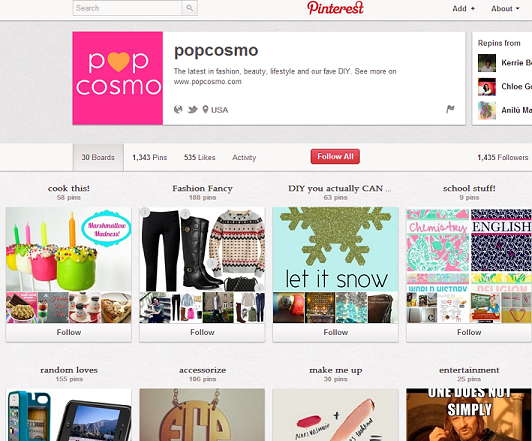
It's actual that they had a site that would normally engage the demographics of Pinterest. In the event that you don't think your site would truly fit in, perhaps you're correct, yet there's still advantage to be had. I've even seen pins of items as commonplace as convenient stockpiling compartments become famous online on social networking channels; it truly comes down to inventiveness and exertion behind the crusade. Social networking promoting is one of the three mainstays of an effective SEO crusade, and Pinterest is a major player in the social networking domain at this time.

There are numerous approaches to utilize Pinterest for positive-ROI advantage. In the event that you need to begin with it, here are a couple tips to remember:


Be Selective: Don't pin every single product in your store, every image from your blog, etc... Pin the best ones.
Use Teasers: Don't give all the goodies away in one image or one image description. Create pins that relate to your products or service and give just a little info to guide them to your site for more.
Add 'Pin It' Buttons: Just as you integrate social networks and sharing buttons on your website, be sure to add buttons that make it easy for other people to pin your images. Add a follow button for your Pinterest profile, too.
Use Lots of Images: Use lots of images on your site so there's more for people to pin. Remember that you can pin videos, too!
Pin Often, Pin Variety: Pin often. The more you pin, the more people who are likely to see one they like and re-pin, like, follow or comment. Remember that unlike other social networks, images on your boards have a long shelf-life. They aren't buried as easily as a Tweet. Don't just pin your own images, though. Repin, like, follow and comment other pins/pinners that are relevant to your industry or might be interested in your business at some point. Be personable.
Pin Interests: Most people on Pinterest don't want to "see marketing". They want to find what they're interested in and they want to "see people". So as you have time, make boards on topics that interest you and pin and interact on those boards too.
Pin Vertically: By vertically, I mean that literally... use images that are taller than they are wide. Because of Pinterest's layout, it will attract more eyeballs. Using dark borders on your image or adding text (think memes) can also help.
Pin Mashups: Take several examples of something and combine them into a vertical image showing each on in a different block. Great for grouping favorite items, how-to steps, etc.
Feature Customers: Make your customers feel special and they'll keep coming back. You can do that in many ways on Pinterest. You could create a board where you feature a particular customer each week. You can hold contests that require repinning (or whatever you like) for an entry.
Secret Boards: A new feature to Pinterest is secret boards. These can be used in many ways. You could offer a membership type board where only VIP members are invited to view and contribute to the board. You can even use it as a collaboration area for your employees. You could use it for private clippings and viewings of ideas for your landscaping, interior decorating, wedding planner customers (so many possibilities!).
Tools for Pinterest:
There seem to be new tools sprouting up for Pinterest each week and lots of current social media tools are integrating Pinterest. Some are paid tools, but there are lots of free ones. While you may want to invest in some of the more robust paid ones in the future, here are just a few free ones that you can consider using when getting started:
ShareAsImage (Was previously PinAQuote): Quotes and sayings are popular on Pinterest. If you aren't a graphics person it can be a challenge even to create a basic, good-looking quote. It's easy with this tool. Here you can easily create word-based images to share on Pinterest. Simply drag their button to your bookmark bar and it's ready to use whenever you are.
WiseStamp: This is a really cool one, especially for a business. You can display your latest pins in emails that you send. This is a great way to gain new followers. Do you send out a newsletter? By all means, add this to it!
PinPuff: Pin Puff is similar to Klout, but only used for Pinterest. It measures a user's influential potential and even assigns a monetary value to your pins.
Reachli: With Reachli you can actually track the effectiveness of each pin. Social media analytics are important for a successful social media marketing initiative. You simply set up your pin through the website and it'll show you how many repins and likes it gets. You'll see the potential number of people that pin reaches. But what I really like about this is that you can track the number of clicks that the pin has received. Here's an example from the dashboard:
PinReach: I've saved my favorite free Pinterest tool for last. This one is incredible and something that they could easily charge for, in my opinion. The amount of data you can get is incredible, whether you're tracking your own profile and campaigns or you want to spy on other people.
It assigns a score, kind of like PinPuff, but seems much more detailed and accurate. They have a 'guide' to their scoring system that kind of lets you know where stand in comparison to other users. The higher your score, the more influential or popular you are on Pinterest.
Example: only 3 percent of users have a PinReach score of 40. The majority (45.7 percent) fall between a 20 and 29. And only .04 percent have fall between 60 and 69.
Here are just a few screenshots that show just how robust this free tool is:
Trending pins: Here you can see pins that are trending right now. This shot has been cropped to keep it short, but they show way more than this.
This is for trending pins overall. But if you look on your dashboard, you can also look at only your pins to identify your best performing pins (the ones with the most repins). If you click on a particular pin it will take you to the analytics page for that individual pin.
In your dashboard, you can also identify your influential followers (if any). Here are a few of the other really cool reasons I like PinReach...
  • Find the highest reaching members with one click
  • Find the most popular pins
  • Not only find trending pins, but trending members
There are many things on this site that make it my favorite free tool for Pinterest.
Conclusion
I hope this look at Pinterest and the tools available are helpful as you move forward with your online marketing initiative. Pinterest isn't meant for everyone, but it sure can be helpful if your business is visually-oriented. Do you have any other tips for marketing on Pinterest? Let me know in the comments!


Wednesday, 13 May 2015

Online/Internet/Digital Marketing Web Tools For 2015

Digital marketing world and scope is changing regularly. Read this article to find out what are the new best digital marketing tools you can use right now!

Hundreds of digital marketing web tools exist to generate their business online. A professional digital marketing expert picks the right tool for the job.

Here are 50 cutting-edge digital marketing tools to help you to grow your business.
1. Green Lotus
If you’re getting involved with SEO or digital marketing for the first time, you may become extremely overwhelmed. Not only are there an abundance of tools and resources available, SEO can get tricky enough at times that even seasoned veterans can run into problems. Toronto’s Green Lotus, however, is looking to change all that.

The company recently launched a set of SEO and social media tools that are specifically meant to help entrepreneurs and small business owners with their SEO activities and improve their search engine rankings. Green Lotus is offering a 30-day free trial, but packages start as low as $8 per month.

2. Grexit

If you’re using Google Apps, which is a no-brainer, then you may want to supercharge your account with Grexit. This tool converts your regular Gmail into a powerful collaboration tool to help easily manage your project management workflow. There is a free option and pricing plans start at $5 per month.

3. Boomerang

Speaking of Gmail, Boomerang is a nifty tool that automates important email follow-ups, such as sales leads or reminders when bills are due. There is a free basic version and plans starting at $4.99 per month.

4. Klaviyo

Email marketing is still important and should be a part of your marketing strategy, which is why you should make the best out of Klaviyo. This tool helps you send out personalized and targeted emails, but it also has features like analytics, autoresponders, subscription management, and real-time segments. It also integrates with the CRM, shopping cart, help desk, and marketing software of your choice. If the free plan isn’t enough, pricing starts at $25.

5. MailChimp

Since we’re on the topic of email marketing, MailChimp is one of the most popular email marketing tools available. MailChimp allows you to send out targeted emails, subscriber profiles, and automated emails. You can send 12,000 emails to 2,000 subscribers for free.

6. Sniply

With Sniply you can post an ad for your business on relevant news stories that you share with a link driving visitors back to your content. If you use under 1,000 clicks per month Sniply is free. Anything more will begin at $29 per month.

7. Fanplayr

Fanplayr uses big data so that you can analyze, segment, and target your audience. With this real-time information you’ll be able to create customized content and offers which will help you increase conversations.

9. Intercom

Intercom offers four customer communication packages to help you observe, learn, engage, and provide support. Overall, this is an incredible tool if you want to reach and retain customers. There’s a 30-day free trial, with plans starting at $49 a month.

10. Hostt

Hostt is a free w=Web hosting solution that allows you to easily and cheaply host your website for the cost of a domain each year. Total investment = $14 per year. You have the ability to automatically install WordPress, Joomla, and many other CMS solutions. This is an incredible gem that I found a couple months ago and host several sites on.


11. SimilarWeb

SimilarWeb provides competitive insights about a website, as well as the overall digital presence of a company. This includes everything from monthly visits to referring sites to visitor interest. If you purchase one of the Pro versions, which start at $199, you will discover even more.

12. RankWatch

This SEO management platform used to assist you with your digital marketing campaigns, see which keywords are ranking the highest for you, suggestions for improving your site, and keeping an eye on what your competitors are doing. Packages start at $29 per month.

13. IDoneThis

Keeping your team on the same page is crucial. That’s why tools like Trello, Basecamp, Do, and Producteev are so popular. While these tools are amazing and beneficial, sometimes you just need a simple communication tool to reflect on what you and your team did for the day and to celebrate accomplishments. IDoneThis accomplishes just that – with plans maxing out at $5 per month.

14. Rignite

Another collaboration tool is Rignite, which is ideal for social media campaigns. With Rignite you can monitor multiple social media platforms, schedule posts and have access to campaign reports. While Hootsuite and Buffer have been used in the past for monitoring and scheduling, they both don’t include the collaborative features of Rignite. After a 14-day free trial, plans begin at $28 per month.

15. Stripe

If you’re looking for a tool to collect and process payments from your customers, then you have to consider Stripe. However, what makes Stripe stand apart from a service like PayPal is that it can handle coupon codes, invoicing, prorating, and refunds. Stripe charges 2.9 percent plus $0.30 per successful charge, or less – based on volume. You should also check out Recurly if you need a solution for recurring subscription payments.

16. SumoMe

SumoMe is a powerful tool that will give your site, and business, a major boost. SumoMe has a number of features that include a scroll box for email signups, contact forms, heat maps to see where your visitors are coming from, and a tool that auto-optimizes your share buttons.

17. WooRank

Whenever there’s a free tool available to help increase your business, it’s definitely a win-win scenario. WooRank is one of these tools since it performs a free and in-depth SEO audit of your site.

18. QuillEngage
Don’t worry if you don’t understand the data in your Google Analytics reports. Not everyone has the time or technical knowledge to decipher an analytics report. With QuillEngage, however, you are given an easy-digest report with actionable advice to improve your site’s performance.

19. StreamScience

StreamScience is a great online marketing tool that assists you with creating, curating, and distributing content that will reach the right audience at the right time, which means that you don’t have to do content marketing all on your own. There’s a free personal plan and a professional plan for $9.99.


20. Crazy Egg

There are several tools, such as Mixpanel, that can help you understand the behavior of your audience – which can be used to improve engagement. However, a cheaper and equally effective is Crazy Egg. This tool provides a heatmap so that you can see where your customers are coming from and what they’re doing on your site. Starter plans begin at $9 per month.

21. Optimizely

Optimizely can be used to test pages, segment visitors, and track everything from engagement to clicks, conversions, and sign-ups so that you can make actionable decisions. There’s a free Starter Plan if you’re not ready for Enterprise.

22. Ampervize

In case you didn’t notice, there are a lot of online resources for growing your start-up. The thing is, not all businesses are the same. That’s why a free tool like Ampervize comes in handy. Just answer a couple of questions and you’ll be directed to the online marketing sources suited best for your start-up.

23. PunchTab

Looking to boost loyalty and user engagement? Then you have to give PunchTab a try. This software-as-a-service platform gives you the power to reward users for sharing or commenting about your products through customized gifts, gamification, and other socially driven activities.

24. Nimble

Nimble has many amazingly useful features that include: contact management, insights, social listening, activity management, and a unified inbox. Overall, Nimble could very well be the most complete CRM available. Pricing is $15 per month per user.

25. LaunchRock

While Squarespace is an outstanding place to showcase your products, LaunchRock is a simpler site builder option that was designed specifically for acquiring customers early on. Use LaunchRock to also validate an idea and generate some interest in your start-up.

26. Guides.co

One of the best ways to help your start-up grow is by demonstrating your authority. This can be accomplished by creating useful information for your audience. With Guides.co you can create and publish helpful guides to help you and your business get discovered by influencers and your target audience.

27. UserTesting

Want to know what people think of your website, video, or product? Look no further than UserTesting. This powerful tool is a great way to gain priceless feedback from real people. The Basic plan starts at $49 per month.

28. Colibri

Colibri is a great tool to discover influencers in your industry, monitor what people are saying about your brand, and keep track of your competitors. By using this tool you can jump into the right conversations online. The Standard Plan begins at $95 per month. If that’s too much, you may want to look into a company like Positionly.

29. Cyfe All-in-One Dashboard

Let’s keep this short and sweet. Cyfe has an effective all-in-one dashboard that keeps track all of your businesses activity. You can also customize Cyfe to help your start-up grow the way you see fit. You can sign up for free, but the Premium plan only costs $19 per month ($14 per month if paid annually.)

30. HiQ

HiQ Labs makes it easy to predict human behavior online. Using HiQ you can help improve retention rates at your company as well as place people in the best jobs possible. This helps with workplace planning.

31. Wistia

Video marketing is a big deal. And it’s only going to get bigger. If you don’t want to come off as an amateur, then you may want to use Wistia to create videos and keep track of who’s been watching them, and for how long they watch. If the Free Plan isn’t enough, there is a Small Business for $25 per month.

32. Searchmetrics
With Searchmetrics you can now many data-driven decisions with your content. Because content is the backbone of many companies and being found online, Searchmetrics helps you figure out what keywords and content you should be writing about for top results. Easily compare your content with your competitors’ content.

33. BuzzSumo

BuzzSumo can connect you with industry influencers, content discovery, and backlinks. In short, it’s a pretty spectacular tool. If you have the extra funds, BuzzSumo has Pro plans starting at $99 per month.

34. Oktopost

Oktopost is a social media management tool designed just for B2B marketing. Not only can you schedule posts to Facebook, Twitter, and LinkedIn, you can also measure the results of campaigns by tracking each lead you generate. After a 30-day free trial, plans start at $55.

35. Raven Tools

As mentioned earlier, there are a lot of available SEO tools. Raven Tools comes equipped with a set of tools for all of your SEO, PPC, content marketing, and social media needs. What makes Raven stand out, though, is that it cuts out time-consuming tasks by generating in-depth, easy-to-understand reports. Packages start at $99 per month, which isn’t bad if you want to add this with something like Google Analytics.

36. Yoast WordPress SEO

WordPress is a great tool for start-ups. It’s free, easy-to-use, and can be customized to fit your needs. However, to get the most out of WordPress you’ll need to get the Yoast WordPress SEO plugin. This plugin optimizes your WordPress site by providing you with features like a content analysis function and automatically generated XML Sitemap.

37. Connect Up

An interesting contact manager. Write one note, have it personalized and sent to hundreds of people in seconds. It will sort through contacts and choose to send the note via email vs. Facebook vs LinkedIn vs. text.

38. ShipStation

If you have to ship physical products via UPS, FedEx, USPS, DHL, OnTrac, and others, they integrate with tons of platforms and make the whole process seamless.

39. AngelSpan

Investor relations for start-ups to help manage, curate, and report on communications to save the entrepreneur time and energy.

40. Radius

For cleaning sales/contact data and prospecting based on vertical/size/geo.

41. Hipchat

Makes it easy for your team to communicate and engage with one another. Other favorites include Slack and Asana.
42. Shareist or IFTTT

Social sharing is vital to getting your story out. Shareist lets you capture content URLs, feeds, and ideas, share them immediately on social media, and save them for building and publishing pages to your blog. Or you can find great content using Zite, FlipBoard, Buffer’s Daily App, Triberr and then use a combination of Pocket, Buffer, and IFTTT to enable your social sharing.

43. Triberr

When you create your own content, Triberr helps content creators get more shares through superfan activation, employee advocacy, and tribe marketing. Use it to build a tribe to share your content.
44. Mozu.com

Gives you the power of a platform like Magento without all the server and software maintenance. They have really advanced developer tools to help deliver experiences that are pretty much impossible on ecommerce platforms like WooCommerce, BigCommerce, or Volusion (sister company of Mozu). The price point isn’t low, but if your start-up is making money from e-commerce, stability, support, and speed are totally worth the investment.
45. CommerceSciences

Sure, A/B testing is great but after a few experiments you end up serving the exact same experience for all visitors, which is really false by nature. This is where website personalization platforms such as the popular Commerce Sciences kicks in – it enables marketers to significantly drive SaaS or e-commerce sales by serving the right content to the right visitor at the right time. For instance, an e-commerce marketer may target shoppers which added $50 to $90 worth of goods to their cart, with an upsell coupon which could be claimed if they are to add more items and reach $109.

46. GoAnimate

GoAnimate is a simple tool to create your own custom videos that you can share using Wistia for analytics and lead generation.

47. Camtasia

While we are talking about video. Capture screen recording and edit your videos. This is important for product demos and walkthroughs. Video is so important to marketing today.

48. Conspire

If you are raising funds, reaching out to potential clients or trying to do business development, you will want introductions to people. Conspire tells you exactly how to get the best introduction to whoever you want to meet — a customer, employer, or investor.
49. HoneyBadger

Want to keep an eye on potential competitors? Here is a Chrome extension that shows you how much traffic a site gets, how much money they raised, what powers their stack, and much more.
50. BlitzMetrics

One of the most effective digital marketing tactics we have found is remarketing with Google and Facebook. While it seems easy, you want to make sure you set it up properly to maximize your growth potential. Here is a step-by-step guide for start-ups to generate killer lead generation and sales using Facebook and Google in tandem, or they have a service to set it up for you or to train you to do it.

Thursday, 7 May 2015

Ways to Improve Social Shares for Your Blog

#1: Add Meta Data 

Make things as simple as could reasonably be expected for the individuals who need to impart your site content. Give meta subtle elements as a feature of your post. At that point, when somebody imparts your substance to Twitter, Facebook, LinkedIn or Google+, it will be shown in the best conceivable route on every channel.

Know.em has an apparatus for verifying whether pages on your site are enhanced effectively for imparting on social networking.

Enter in the site location of your blog entry and it will issue you a rating out of 100% for each of the informal organizations.


#2: Make Image Sharing Easy 

Make connecting with pictures for your posts and after that urge your site guests to impart them.

Among different functionalities, SumoMe permits you to put social offering symbols on pictures. In this manner, when somebody drifts over a picture in your blog entry, they will see an alternative to impart on Pinterest, Facebook or Twitter

#3: Optimize for Mobile 

In the event that you check your examination, you'll presumably find that no less than 20% of your activity originates from a cell phone.

Upgrade for versatile imparting, so your fans can impart on the go.

SumoMe's offer bar permits individuals to post your substance crosswise over numerous channels. At the point when a guest peruses your web journal substance on a cell phone, an offer bar shows up over the base of the screen. This makes it extremely clear and simple to impart.


#4: Create Tweetable Snippets 

Add ClickToTweet connections to your site, so your guests can smoothly impart your substance through Twitter.

Sign in, approve the application and make a basic tweet: a title, cite, detail or question in the content, alongside the article join. At that point add the ClickToTweet connection to content (or connection with Twitter picture) to the post. At that point when somebody is perusing the article and is roused to send it to his or her system, they'll snap to impart your prepopulated tweet.

Case in point, in a late article, Post Planner recorded 50 SEO specialists with a ClickToTweet interface under each master's subtle elements.


#5: Experiment With Titles 

The titles of your blog entries have a gigantic bearing on the quantity of shares they get.

To compose convincing titles that will firmly urge individuals to tap on your post, here are a few apparatuses worth attempting:

Passionate Headline Analyzer aides assess if your title is going to engage the feelings of your site guests. Enter your proposed title and it will issue you a rating out of 100%. Change the title until you get a higher score.

Social Warfare permits you determine the content that is imparted (not the same as the article title), when a guest taps the Tweet catch. The title you use in your post may not be the ideal title for Twitter.

BuzzSumo is a substance examination device. Enter the name of your (or your competitor's) site to figure out which substance has the most imparts. This will issue you great understanding into the sort of posts/titles that get the most consideration.

When somebody imparts your substance on any of the online networking channels, the title is one of the key things that will allure them to tap on it and read more. Make it great.


#6: Reshare Content 

After you make another bit of substance, think of a timetable to impart it a few times, so a greater amount of your group of onlookers sees it.

It's exceedingly improbable that 100% of your gathering of people is online when you impart a blog entry, particularly on a stage like Twitter, so the dominant part of your adherents most likely won't see it.

Support highlights a scheduler, which permits you to indicate when you need to convey your substance and on what channels. Case in point, impart your blog entry to Twitter when it goes live, of course in 8 hours, a day, a week and some custom time later on. Likewise, fluctuate your timing when you impart presents on different channels.

The best time to post substance relies on upon various elements: the industry, the kind of individuals you're focusing on, the sort of substance and that's just the beginning.

A ton of it boils down to experimentation. Utilization devices, for example, Buffer to timetable substance for a mixed bag of times. At that point take a gander at the examination to see which times got the best engagement and movement.

Another choice is SocialBro, which demonstrates to you the seasons of the day your crowd is on Twitter. Note: you may not have any desire to focus on your group of onlookers when a large portion of them could be on the web, as it could be the busiest and most focused time to impart content.

#8: Post to Online Communities 

After you post substance, contact other online groups that may be keen on what you need to say. This could create activity, which will prompt shares.

Case in point, Scoop.it is a substance curation stage where individuals make sheets of substance and other individuals can take after those sheets. In case you're a dynamic individual from Scoop.it, individuals will begin taking after your sheets and will impart your substance to diverse social channels. This will prompt more prominent perceivability and conceivably more imparts.

Don't simply join a bundle of groups and offer substance. You have to be a dynamic part. Simply choose the most pertinent groups and communicate with others in a natural way.